Read the accuracy pill
What each state, colour and number in the accuracy pill means, what the expanded toolbar shows, and when to wait before you measure.
On this page
The dark pill at the top right of every screen tells you where your position is coming from and how good the source thinks it is. Glance at it before every measurement. It's the quickest way to spot a dropped receiver, a float solution or stale corrections.

Tap and hold
- Tap the pill to expand it into the solution toolbar. Tap the chevron (⌃) to fold it back.
- Hold the pill, or tap ⋯ in the expanded toolbar, to open the Precision sheet. That's where you choose the position source, set the antenna height, connect corrections and see the full receiver status. You can also reach it from Settings → Precision & receiver.
The collapsed pill
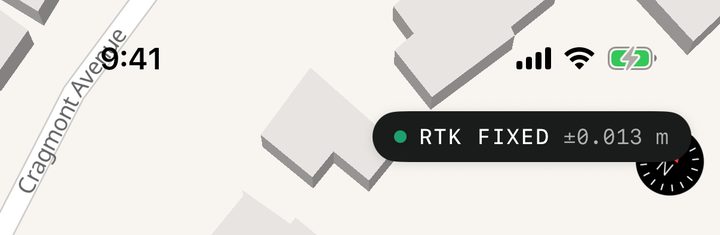
The pill shows a coloured dot, a state in capitals, and the horizontal accuracy (for example RTK FIXED ±0.013 m).
| Pill reads | What it means |
|---|---|
| GPS ±3.200 m | Positions are coming from the phone's own GPS (or from a receiver iOS is relaying; see Phone GPS or a receiver). |
| RTK FIXED | A connected receiver has a fixed RTK solution. This is the only state that means centimetre-level. |
| RTK FLOAT | The receiver is getting corrections but hasn't resolved a fixed solution. The number can look small and still be wrong. |
| RTK DGPS, RTK SINGLE, RTK DEAD RECKONING | The receiver has a fix of that type: differential, autonomous (no corrections) or dead reckoning. |
| RECONNECTING | Your receiver has dropped and the app is trying to get it back. Until it does, positions fall back to the phone's GPS. |
| NO FIX | No position with a usable accuracy yet. Wait, or move to a clearer view of the sky. |
The number uses your display units, so it reads in feet if you've chosen feet under Settings → Units.
Colours
The dot is always shown with words and a number, never colour alone.
| Colour | When |
|---|---|
| Green | Receiver, RTK FIXED |
| Amber | Receiver with another fix type (DGPS, single) |
| Red-orange | RTK FLOAT, RECONNECTING or NO FIX |
| Grey | Phone GPS. Grey on purpose, so a good phone reading never looks like survey quality. |
The dot on the project strip above the tabs uses the same colour.
The expanded toolbar
The top row shows the source and fix, and the bottom row shows the accuracy figures:
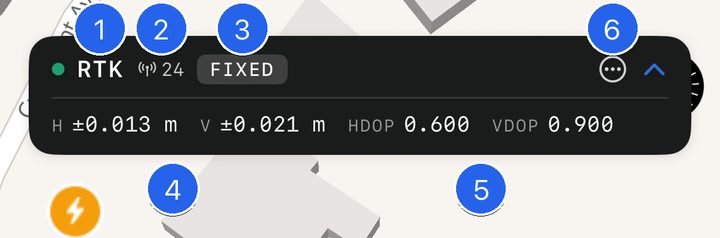
- GPS or RTK — the source.
- Satellite count (antenna icon) — with a receiver.
- Fix type badge, for example FIXED — with a receiver.
- H and V — the horizontal and vertical accuracy estimates. V shows — when the source doesn't give one.
- HDOP and VDOP — horizontal and vertical dilution of precision. Receiver only, and VDOP only if the receiver sends GSA sentences.
- ⋯ — opens the Precision sheet. The ⌃ beside it collapses the toolbar.
With a receiver, the top row also shows the correction age.
Correction age
Correction age is how old the corrections behind the current solution are, as reported by the receiver.
- age 1.2 s in normal text: corrections are arriving.
- The age turns red-orange when it's more than 10 seconds. Wait for it to come down before taking a shot.
- no corrections (red-orange) appears when the receiver has a single or DGPS fix and reports no correction age at all. The fix won't improve to RTK until corrections reach the receiver. See Get RTK corrections over NTRIP.
Where the numbers come from
- Phone GPS: the accuracy iOS reports for the location.
- Receiver: the receiver's own error estimates from its GST sentence when it sends one. Without GST, the app estimates from HDOP (horizontal) and VDOP (vertical), which is rougher. A receiver that sends neither shows — for V.
Every figure is the source's estimate of its own precision. It can't see a wrong base coordinate, a wrong antenna height or a false fix. To test real accuracy, check a known point.
Full receiver status
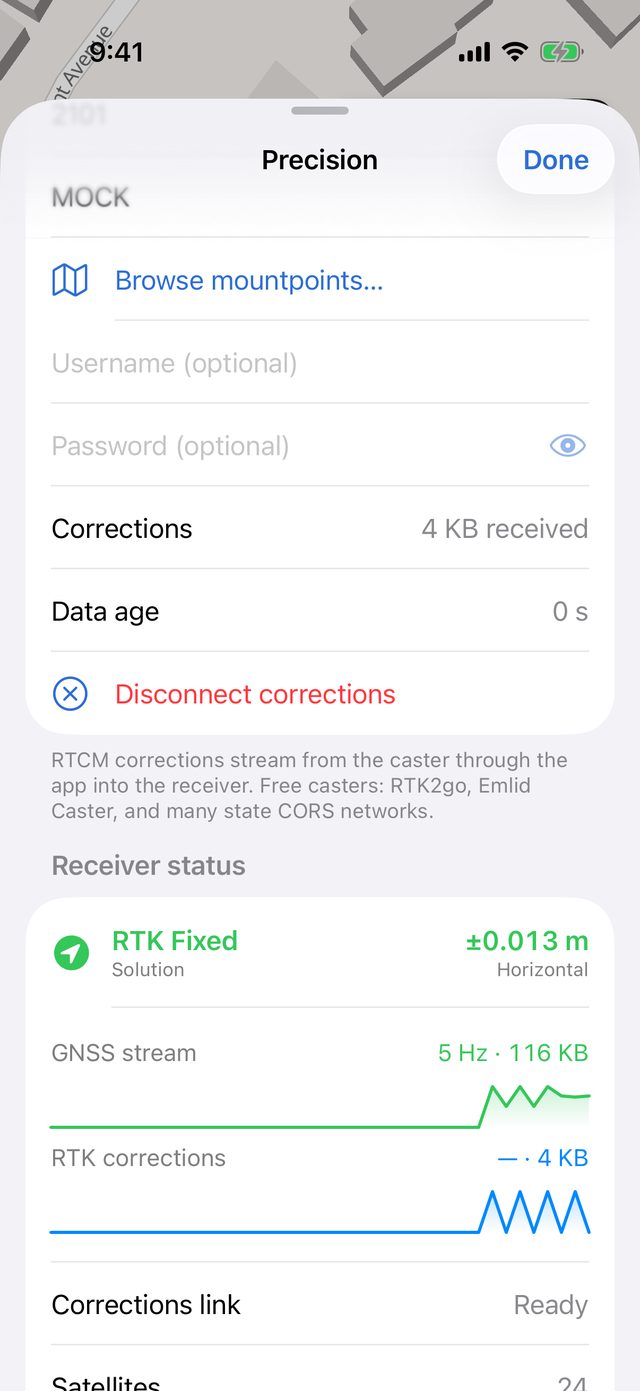
With a receiver connected, the Precision sheet has a Receiver status section with more detail than the pill:
| Row | What it shows |
|---|---|
| Solution | The fix type in colour (RTK Fixed, RTK Float, DGPS, Single, Dead Reckoning, No Fix) and the horizontal accuracy |
| GNSS stream | A live graph of data from the receiver, its GGA rate in Hz and the total received |
| RTK corrections | A live graph of NTRIP corrections, in bytes per second, or not connected |
| Corrections link | Ready if corrections can be sent to the receiver, Not available if not |
| Satellites, HDOP, Correction age, PDOP | From the receiver's sentences |
| Horizontal σ, Vertical σ | The receiver's GST error estimates |
| Messages | Which NMEA sentences are arriving and how often, for example GGA 5 Hz · GST 5 Hz |
| Talker | The NMEA talker IDs seen (for example GN) |
| Base distance | Distance to the base station, when the receiver reports it (Emlid) |
| Time source | GNSS UTC when fixes carry the receiver's time, otherwise Phone clock with a hint on how to fix it |
| Antenna height | The height being subtracted, for example −2.000 m applied |
| Tilt | Tilt angle and heading, when the receiver reports tilt |