Set the antenna height
Enter your pole height and receiver offset so elevations describe the ground, and set the camera offset for handheld photo capture.
On this page
A receiver measures the height of its antenna, not of the ground under the pole. Tell the app how tall the pole is and which receiver sits on it, and it subtracts that from every elevation, so your points describe the ground.
Before you start
- Measure the pole from the ground point to the receiver's bottom mount.
- Connect your receiver. The antenna height only applies to receiver positions. Phone GPS heights aren't adjusted.

Set the pole height and receiver offset
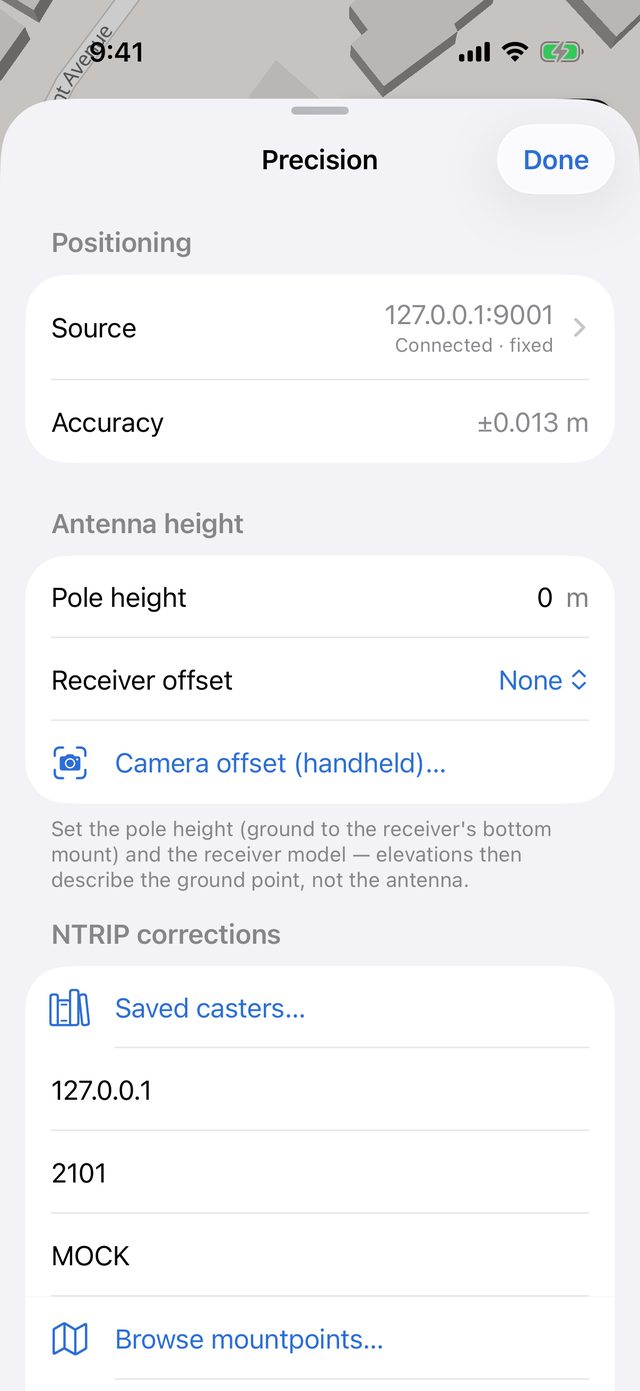
Hold the accuracy pill to open Precision.
Under Antenna height, tap Pole height and enter the height in metres. A 2 m pole is 2.000. Up to three decimals.
Tap Receiver offset and pick your receiver:
Option Adds None 0 Reach RS2/RS2+ (+134 mm) 0.134 m Reach RX2 (+147 mm) 0.147 m The offset is the distance from the bottom mount up to the antenna. Pick None for any other receiver and include its offset in the pole height if you know it.
Check the note under the section. It reads "Elevations are reduced by 2.147 m (pole + antenna offset) so they describe the ground point."
With a receiver connected, Receiver status shows Antenna height −2.147 m applied, so you can confirm it at a glance.
What's recorded
The total subtracted height is recorded with every receiver fix, even when it's zero, because "the app subtracted nothing" is useful to know. It's exported in data.csv in the bundle. The QA report flags points where no pole height was entered.
Only elevations change. Horizontal positions are the same with or without an antenna height.
Tilt compensation (Emlid)
Some receivers can correct for a tilted pole. When an Emlid receiver reports that it's tilt-compensating, the Antenna height section changes:
- If you've set a height here, you see a warning: Receiver is tilt-compensating. "If 'Stream compensated position' is on in Emlid Flow, the pole height is already included in every fix and the 2.000 m set here would be subtracted again. Keep the height in one place only." Tap Set height to 0 here (use Emlid Flow's) if Emlid Flow already has the height.
- If the height here is zero, you see Tilt compensation active — antenna height comes from Emlid Flow.
Receiver status also shows the Tilt angle and heading while the receiver reports them.
Leica Zeno
Zeno Connect has its own antenna height setting. Set it to 0 in Zeno Connect and enter the pole height here. If a height is already set in Zeno Connect, keep the pole height here at zero instead, so it isn't applied twice. See Connect a Leica Zeno antenna.
Camera offset (handheld)
When you hold the phone with a receiver mounted beside it to take photos or photo scans, the antenna isn't where the camera is. The camera offset tells the app where the antenna sits relative to the lens. It applies to photo capture positions. The pole height applies to surveyed points instead.
In Precision, tap Camera offset (handheld)…. You can also go to Settings → Camera offset (handheld).
Pick a Mount:
- Left or Right: presets for the Emlid RX2 capture grip, with the receiver on that side of the phone. The receiver sits 7.9 cm to the side, and the antenna 10.7 cm above and 2.9 cm behind the camera.
- Custom: enter your own measurements.
To enter measured values, fill in, in metres:
- X — right of camera (negative is left)
- Y — above camera (negative is below)
- Z — behind camera (negative is in front)
Editing a value switches the mount to Custom.
Tap Done.
Measure from the camera lens to the antenna phase centre. The diagram updates as you type. Once an offset is set, the Precision row shows it, for example −0.08 / +0.11 / +0.03 m.